VPS in Trinidad and Tobago
- 24/7 English speaking support
- SSD, NVMe, HDD storage options available
- Excellent scalability
- Deployment in a matter of moments

VPS Trinidad and Tobago pricing plans
Thank you for your inquiry.
We will contact you shortly!

VPS in adjacent locations
-10%


 Windows
€ 28.44 /mo
Billed annually
-10%
 Linux
€ 70.49 /mo
Billed annually
-10%
Linux
€ 15 /mo
Billed annually
-10%
Linux
€ 7.7 /mo
Billed annually
-10%
Linux
€ 16.45 /mo
Billed annually
-7.2%
Linux
€ 6.4 /mo
Billed annually
-10%
Linux
€ 28.24 /mo
Billed annually
-10%
Linux
€ 50 /mo
Billed annually
Comes free of charge
-
![VNC Access to the Server]()
VNC Access to the Server
-
![Web panel VirtualMin, Hestia, VestaCP]()
Web panel VirtualMin, Hestia, VestaCP
-
![IPv6 + IPv4 bundle]()
IPv6 + IPv4 bundle



Additional services
-
 Additional IP addressesfrom € 4
-
 Backup Spacefrom € 2
-
 Additional Traffic From 20 TB and Higherfrom € 19
-
 DevOps Servicesfrom € 67
YOUR QUESTIONS, OUR ANSWERS
-
How to reboot my VPS server?Just use our Quick Management module (Services->My services->QM) or go to Services->My services->View Details-> Reboot
-
How to reset Windows VPS password?This is quite a simple procedure, so you can do this yourself, following this guide:
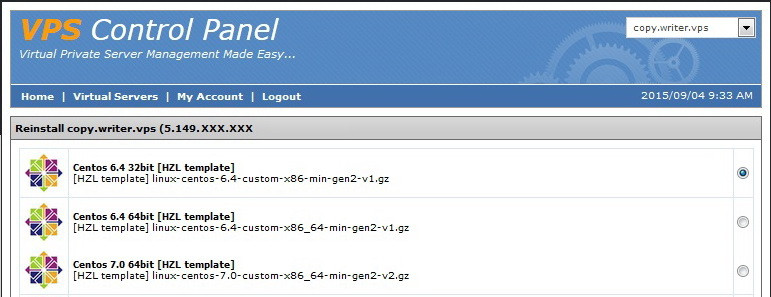
1. In VPS Control Panel mount CDROM "Win2012_DC_64bit_with_virtio"
2. In VPS Control Panel on Drivers page mount "Virtio 0.1 81" drivers
3. Reboot VPS, then press any key to start installation CDROM
4. Select Language and press Next
5. Click "Repair Computer" -> "Troubleshoot" -> "Advanced options" -> "System Image Recovery"
6. Click "Cancel", then "Select a System Image" -> "Next" -> "Advanced..." -> "Install a driver" -> "OK"
7. Go to "CD Drive" -> "WIN8" -> "AMD64"
8. Select "VIOSTOR.inf", click "Open" -> "Add Drivers..."
9. Go back to main menu and click "Troubleshoot" -> "Advanced options" -> "Command Prompt"
10. Type "E:" (drive name may vary) and click Enter
11. Type "cd windows/system32" and click Enter
12. Type "ren utilman.exe utilman.exe.bak" and click Enter
13. Type "copy cmd.exe utilman.exe" and click Enter
14. In VPS Control Panel unmount Drivers and installation CDROM
15. Reboot VPS from VPS Control Panel
16. Try to login via RDP or simply open VNC
17. Click on the Utilities Manager button (in the left bottom corner), Command Prompt window should come up
18. Type "net user Administrator ANY_NEW_PASSWORD" and click Enter
19. Close Command Prompt window and login to Windows using password "ANY_NEW_PASSWORD"
20. Open Command Prompt or PowerShell, go to "c:\windows\system32" directory
21. Type "del utilman.exe" and click Enter
22. Type "copy utilman.exe.bak utilman.exe" and click Enter
However, we recommend submitting a ticket to our admins regarding the matter. -
What is the best VPS OS?Choosing the best VPS OS is quite easy, actually. The choice depends solely on your goals and preferred type of software/scripts/management.
Windows-based software like .ASP net, Virtual basic and so on requires Windows Server environment, meaning choice is quite simple. Being able to access your files via RDP while remaining within interface you are used to is a great advantage of Windows environment.
However, majority of tasks is done best by Linux/FreeBSD systems due to their better performance under peak loads, ease of management and better stability.
The most popular system is CentOS (Community Enterprise OS) of Red Hat Enterprise Linux. It is free, compatible with most control panels and updated regularly. We provide several CentOS versions compatible with control panels like WHM, DirectAdmin, Virtualmin and ISP Manager.
However, as some clients require Fedora, Ubuntu, Debian or FreeBSD we provide and support latest several versions of these OS too. -
How to disable Internet Explorer Enhanced Security on Windows VPS?Due to Internet Explorer Enhanced Security Configuration (IE ESC) it becomes a real problem to download anything to your server through Internet Explorer.
Even opening a simple web-page will take at least 6 times of clicking through the IE ESC warnings.
It will also prevent you from installing some applications which need internet connection during install progress. (e.g. Oracle Java)
So if you want to disable Internet Explorer Enhanced Security (IE ESC) follow the next steps:
Open Server Manager (your can find it at your taskbar panel)
In the Server Manager Dashboard, click on Local Server on the left side
At the right column of Server Properties you’ll see the option named "IE Enhanced Security Configuration". Click "On" to change the option.
You’ll be prompted to turn off IE ESC for Administrators and/or Users. Select your option and click OK
Please, keep in mind, that disabling IE ESC may open your server to some IE potential vulnerabilities. -
How to monitor VPS CPU loadCPU usage value shows how much server CPU time was consumed by this process within alotted period.
Lets say you have 100 processes running, meaning CPU should split its core time between all these processes within a period of time (1 second, for example). If we assume all processes receive equivalent parts of core time, 1 process should receive 1/100 second during each second (0.01) and use it to work on its inner queue of tasks. -
How to get additional IPs?You can get up to 5 IPv4 without justification, depending on your VPS or Dedicated Server plan. Lower plans get less IPs.
In case you ordered only one or insufficient number of IPs, your server can be upgraded anytime in Client Area or via Support Ticket request.
Should your project demands more than 5 IPv4 per server, please submit request to Support and we will look what we can do for you. In most cases you will have to fill in the IPv4 Justification form.







Still unsure what to choose?